
Stop paying for IT only when it breaks
If your network goes down right now, would you know before your team starts complaining? MiBOT runs your IT proactively for R450 per user per month (excl VAT, 12-month contract) — less than 1 hour of break-fix labour.
- 24/7 monitoring on your network, printers, Wi-Fi, and firewalls
- Sub-1-hour response time on logged incidents
- Monthly health reports — no more invisible IT
- Local teams in Centurion (Gauteng) and Rustenburg (North West)
“Great customer service. Very professional. Thanks.”
- 5.0 on Google
- < 60 min response SLA on logged incidents
- R450/user/mo flat
- 25+ years serving SA SMBs
Here's exactly what happens when something breaks.
We see it. We fix it. Often before you even notice.
Watch
See how MiBOT keeps SA businesses running
A 60-second look at proactive managed IT — 24/7 monitoring, sub-1-hour response, and monthly reports from just R450/user/month.
What “normal” IT looks like in most SA businesses
Most businesses we speak to are running day-to-day on a network that somebody set up at some point, and it kind of just… grew.
The team sits with these daily frustrations — email’s slow, the printer won’t connect, files take forever, someone can’t get onto the VPN — and everyone just accepts it as normal. It becomes background noise.
The real risk isn’t even the frustration — it’s what you can’t see. Most SA businesses find out from a user, not from a system. Because nobody’s watching. We are.
Break-Fix waits for failure. MiBOT prevents it.
Monitor
We watch your network, printers, Wi-Fi access points, and firewalls — 24 hours a day, 7 days a week. The moment a server’s CPU spikes or a disk starts failing, our team knows. Your team doesn’t have to.
Scan
Continuous vulnerability scanning across endpoints and servers. Antivirus on its own is like having a lock on your front door but leaving all the windows open — we layer scanning, patching, and ransomware protection together so the windows close too.
Patch
Operating-system and application updates rolled out on a documented schedule. Critical security patches expedited. No more “we meant to update that last quarter” conversations after an incident.
Report
A monthly report lands in your inbox showing what happened, what we caught, what we patched, and what we recommend next. You finally have visibility into what your IT spend is buying.
What’s covered — and what we add on.
Monitoring & Security
24/7 watch on servers, network gear, endpoints, and firewalls. Antivirus, ransomware protection, and Privacy Mode controls layered together — not antivirus alone.
Microsoft 365
Licensing, mailbox management, OneDrive, Teams, SharePoint, and the security baseline that goes with them. Conditional access, MFA, and PAMM-controlled admin rights configured by default — available as a managed add-on, quoted to your licensing.
Backup & Recovery
Daily backups of servers and Microsoft 365 mailboxes to immutable storage. Tested restore drills so when the day comes, we already know it works — we’re not finding out for the first time. Available as an add-on to your managed plan.
Communications
VoIP, email, and collaboration platforms managed end-to-end. Number porting, hunt groups, and call-flow design for businesses that can’t afford a dropped customer call — available as an add-on when you need it.
Desktop & End-User Support
Helpdesk tickets answered by people in Centurion and Rustenburg — not an overseas call centre, not a chatbot. Sub-1-hour response on logged incidents, with named technicians who learn your environment.
Network & Infrastructure
Switches, Wi-Fi access points, routers, and VPN tunnels. Monitored, patched, and documented — not held together with someone’s memory of how it was set up three years ago.
What would MiBOT cost your business?
Slide to your team size and a bad month of downtime — the numbers update live.
MiBOT flat fee
R5,400/mo
12 users × R450/user/month
- Unlimited remote support
- Patch management
- Network monitoring
- Antivirus & anti-ransomware
- Sub-1-hour response on logged incidents
Your downtime cost
R23,040/mo
6 hrs × 12 staff × R320/staff-hour
Estimate — salary + lost output, SA SMB average. The invoice isn't the expensive part of downtime; idle staff are.
Typical market quote
R6,000–R14,400/mo
What SA MSPs typically quote (R500–R1,200/user)
Most providers won't publish a price at all — you find out after the sales meeting.
Downtime is costing you 4.3× what MiBOT would.
All prices excl VAT, on a 12-month agreement. Backup, Microsoft 365, VoIP and cloud services are add-ons, quoted separately. On-site visits are quoted separately — R450 covers unlimited remote support. Downtime figure is an estimate for comparison — your payroll numbers will differ.
Dedicated > generic helpdesk
When something happens, you’re not explaining your network to a stranger on a helpdesk. The technician answering your call already knows your environment — your servers, your VPN setup, who the key people are, where the on-site server room is.
We’ve heard the line a thousand times: “We’ve got a guy that comes in when something breaks, but half the time we don’t even know there’s a problem until someone complains.” That’s the gap. We close it.
And on the management side, you stop wondering. No more “we’re paying someone, but I have no visibility into what they’re actually doing.” You get a named account manager, a monthly report, and a documented SLA you can hold us to.
What you get — side by side
We publish our price and our response commitment. Most providers publish neither.
| MiBOT | Break/fix | Typical Gauteng MSP | |
|---|---|---|---|
| Price | R450/user/month — published, flat | Per call-out — unpredictable | “Request a quote” |
| Response | Under-1-hour measured SLA commitment on logged incidents | When they can fit you in | “Best effort” |
| Monitoring & patching | Included in the base fee | Reactive only — nothing happens between calls | Often an upsell |
| Who does the work | Named local technicians (Centurion + Rustenburg) | Whoever's available | Helpdesk queue |
| Surprise costs | None on covered (remote) work | Every incident billed | Depends on the contract |
R450/user/month excl VAT, 12-month agreement. The base fee covers unlimited remote support, patch management, network monitoring, antivirus and anti-ransomware, with a sub-1-hour response on logged incidents. Backup, Microsoft 365, VoIP and cloud services are add-ons, quoted separately. On-site visits are quoted separately — R450 covers unlimited remote support.
- 25+
- Years in SA IT
- ISO 27001
- Certified ISMS (2022)
- Dual
- Offices Centurion + Rustenburg
- <1hr
- Response on logged incidents
- Monthly
- Reports to operators
What our clients say on Google
5.0 out of 544 Google reviews
Great customer service. Very professional. Thanks.
Piet Nel
Google review · August 2026
5.0 out of 5 from 44 Google reviews by South African businesses we support — unedited, straight from our Google Business Profile. Leave your own review
Book a 30-min call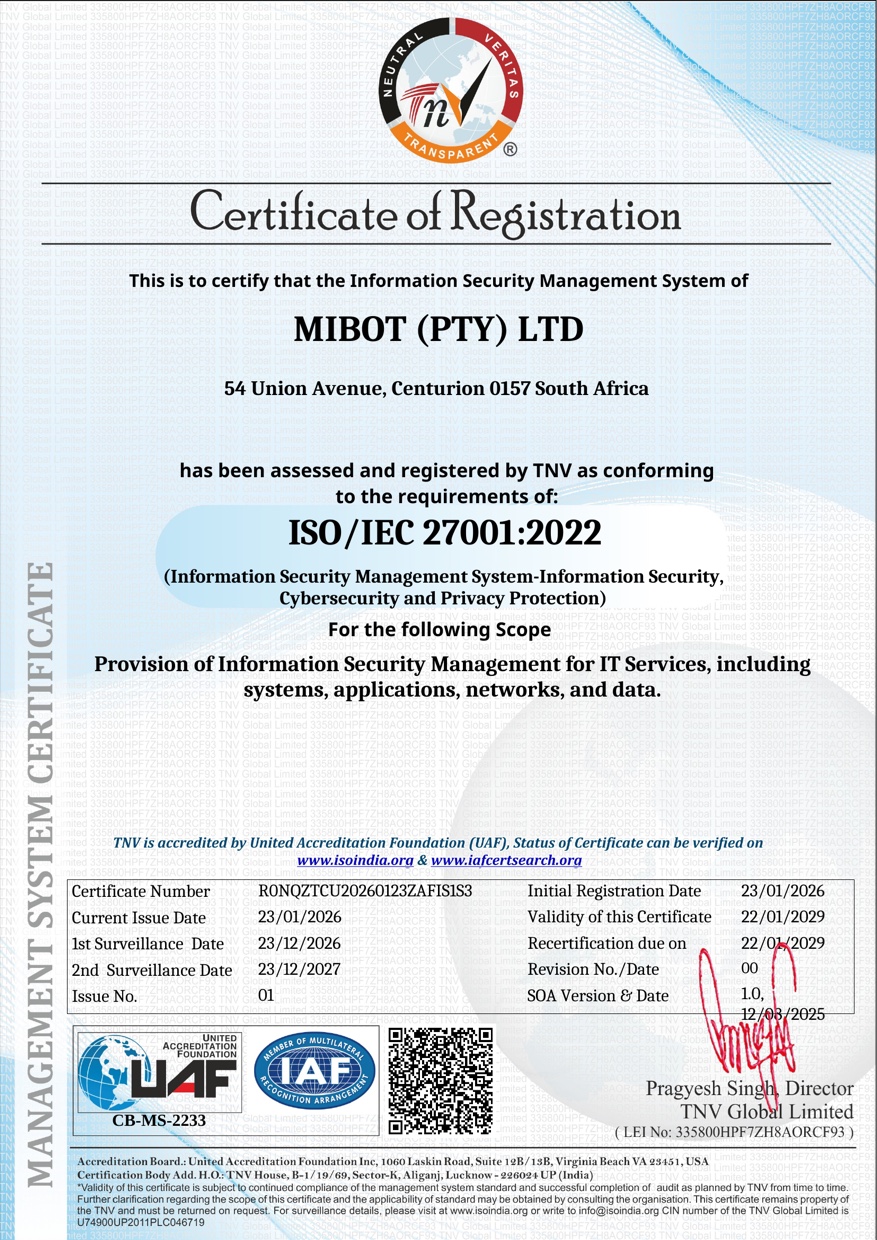
Certified to ISO/IEC 27001:2022
MiBOT's information security management system has been independently audited and certified to the international standard for information security — so when a client or a tender asks how your IT is secured, you can point to verifiable proof, not promises.
- Standard
- ISO/IEC 27001:2022
- Certified entity
- MIBOT (PTY) LTD
- Certificate no.
- R0NQZTCU20260123ZAFIS1S3
- Certification body
- TNV Global Limited
- Accreditation
- United Accreditation Foundation (UAF) — IAF MLA signatory
- Scope
- Provision of Information Security Management for IT Services, including systems, applications, networks, and data.
- Valid
- 23 Jan 2026 – 22 Jan 2029
Issued by TNV Global Limited, accredited by the United Accreditation Foundation (UAF) — an IAF Multilateral Recognition Arrangement signatory. Status verifiable at iafcertsearch.org.
The first 60 minutes
What actually happens after you log an incident with MiBOT.
Minute 0
You log the incident
Phone, email, or portal — it lands with our team, not a bot.
Within 60 minutes
A technician responds — that's the SLA
A named technician who already knows your environment picks it up. Sub-1-hour response on logged incidents, in writing.
Straight after
Remote fix underway
Most day-to-day tickets are diagnosed and resolved over a secure remote session.
If hands are needed
On-site visit — if it's truly needed
Most incidents never need one. When hands-on is required, technicians dispatch from Centurion or Rustenburg — quoted upfront before anyone rolls out; on-site work is separate from the R450 flat fee.
Four steps. Six weeks to predictable IT.
- Week 1
Assess
Step one, we come in and do a proper assessment — not a sales exercise, an actual technical review of what you’ve got. Servers, network, endpoints, backup state, security posture, licensing.
- Week 1–2
Design
We document the SLA that matches your business. Response targets, in-scope services, monthly reporting cadence, escalation paths. You see exactly what you’re paying R450/user/month for before you sign.
- Weeks 2–4
Onboard
Monitoring agents deployed across your fleet. Backup connectors wired up. Documentation captured. Microsoft 365 security baseline applied. Helpdesk credentials issued to your team.
- Ongoing
Manage
From there forward: 24/7 monitoring, sub-1-hour response on tickets, patch cycles, monthly reports. The whole point is that you shouldn’t have to think about IT. That’s our job.
Try us with zero risk on your side
No money-back gimmicks — just transparent terms and a free assessment so you know exactly what you’re getting before you commit a cent.
Start with a free IT assessment
We come in and do a proper technical review of what you’ve got — servers, network, endpoints, backup state, security posture — not a sales exercise. No obligation, no cost.
Flat R450/user/month — no surprise call-out fees
What we quote is what you pay. One predictable per-user line item every month, excl VAT — never an unexpected after-the-fact call-out invoice.
A documented SLA you can hold us to
Before you sign, you see exactly what’s in scope: response targets, reporting cadence, escalation paths. Transparent terms, written down — not a verbal promise.
Sub-1-hour response on logged incidents
Critical incidents are prioritised immediately. Most problems we catch through proactive monitoring before your team even notices them.
Get your free IT Health Score in 60 seconds
Nine questions on backups, patching, MFA and more — instant score out of 100, no email needed.
Managed IT support — FAQ
What does R450 per user per month actually include?
The flat R450 base covers unlimited remote support, patch management, network monitoring, antivirus and anti-ransomware, with a sub-1-hour response on logged incidents. Backup, Microsoft 365 and VoIP are available as add-ons, quoted separately on top. The price is excluding VAT, on a 12-month contract — less than the cost of a single hour from a Break-Fix IT company.
We already have an IT guy. Why would we change?
We’re not here to argue with an internal IT person — we work alongside them. The question is usually whether you have network monitoring, a patch schedule, antivirus and anti-ransomware in place, a sub-1-hour response on logged incidents, and visibility into all of it. Most one-person shops can’t deliver that consistently. We can — with backup, Microsoft 365 and VoIP available as add-ons when you need them.
How fast do you respond when something breaks?
Sub-1-hour response on logged incidents. Critical incidents (server down, suspected ransomware, business-stopping outage) get prioritised immediately. The whole point of proactive monitoring is that most problems we catch before your team even notices — the response-time conversation only matters for the ones that slip past prevention.
Do you only support businesses in Centurion and Rustenburg?
On-site support is anchored on our two offices: Centurion (54 Union Avenue, Kloofsig) for Gauteng, and Rustenburg (193a Kock Street) for the North West / Bojanala corridor. Remote support — which covers the vast majority of day-to-day tickets — reaches businesses across our service area.
What’s “Privacy Mode” and PAMM?
Privacy Mode is our internal control set for limiting where customer data flows during support sessions — nobody on our team sees your data unless they need to for a specific ticket. PAMM (Privileged Access Management Mode) means admin rights to your environment are time-boxed and approved, not sitting permanently on someone’s desktop. Both are trust signals: we treat your data the way we treat ours.
Where we deliver it
The same R450/user/month service, anchored on our local teams — pick your area, or see how managed IT compares to break-fix.
Break-Fix waits for failure. MiBOT prevents it.
Stop wondering whether your IT will hold up. Get a proper assessment, see exactly what R450/user/month covers, and decide from there.
Get a free IT assessment →